Showing posts with label Internet Tips. Show all posts

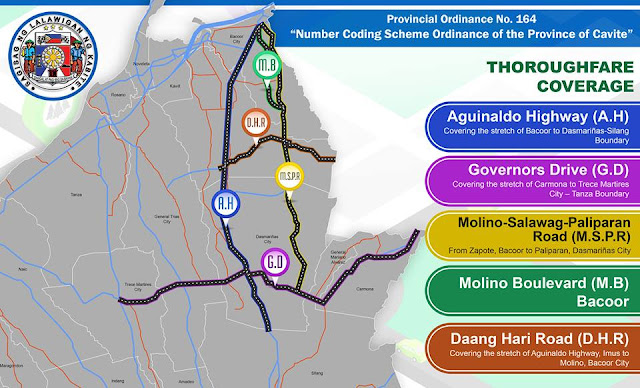
Cavite Number Coding Scheme To Be Implemented On January 9

The Province of Cavite will begin the implementation of Number Coding Scheme later this week. This traffic provincial ordinance isn't alien anymore to that of the Metro Manila Number Coding Scheme being implemented by the MMDA and other local traffic enforcement agency, however, there were only few changes please look at the details below:


For other details please refer to their official Facebook page here.

You Can Now See Who Deleted You On FB

There is a browser plug-in tool called "Who Deleted Me" in which you may now know who removed you in their friends-list. Actually, it's a free extension for browsers in order to keep track of your friends.

And here how it works:

~ When you first time use "Who Deleted Me" it saved your FB friends list like a database.

~ Then when you use the tool for the second time your current FB friends list will be compared to the stored one.

~ Therefore, it automatically reveal who removed you.

This smart tool also shows list of friends whom you deleted or deactivated from Facebook. 

You can download it here.

How To Fix Video Calling Problem in Facebook

The Video Calling service of Facebook via Skype is now getting popular to all its users, however, it's also a trouble for everyone on how to fix the Video Calling Error every time they're trying to access it. You have already installed working webcam but still haven't work. Actually, I did experience it too that is why I am writing this article for you to learn also on how to fix it. Take a look of the image of the actual error.


Honestly, there's nothing wrong with your computer, your webcam and even your Facebook account. It's about the Plug-In of Facebook Video Calling that has a problem actually. It is simply outdated version. Therefore, the solution for this is to update it from 1.2.0.159 to 1.2.205.0. How? Here's the step by step procedure of updating it as easy as 1-2-3:

STEP 1
Uninstall the old version of the Facebook Video Calling Plug-In via Add-Remove Program in Control Pannel


STEP 2
After the latter step, you should install the latest version of Facebook Video Calling Plug-In. You can download it here. Just Ignore the warning. It's not a virus, it's clean.


STEP 3
Then after successful installation, you should be able to access the Video Calling service of Facebook successfully.

Hope this article will help you solve the problem. Please leave a comment. Thank you for reading.

Canva: The New Online Photoshop

Canva beta is now online! The new graphic designing for non-designers.It's kind a Photoshop and MS Publisher together in one website, free, interactive and useful.

You can create graphic designs with ease. There were already pre-sized designs like card, social media, presentation, poster, blog graphic, Facebook cover, document photo collage, business card, invitation, and you can even create custom sized designs.

Another feature that really wows is the interactive functionality of this website because from the chosen design you can simply change background and edit text with their plentiful stocked of high quality designed graphics and arts, free and premium, and you can even upload own images.

In fact, saving and sharing own designs made easy. You can simply click the Twitter or Facebook button to share or click the link/publish button if you want to get custom link for your design or a copy of designs in PNG or PDF format for easy printing.

Look at the samples below:


Start you own design here.

How To Block Annoying Ads On Websites And Much More

 To block annoying ads from various websites, you can use the browser extension called Adblock Plus. This particular browser extension effectively stops possible Malware intrusion, unwanted advertisements, sharing buttons, and much more. And it works well both in Mozilla Firefox and Google Chrome.


Take a look of the image above, obviously the site is filled with annoying advertisements top and bottom. And the most disturbing one is the popup ads that simply blocked the video which you're watching or article you're reading. This browser isn't equipped with Adblock Plus.


Now, please take a look of the image above, obviously the website was so clean and no signs of unwanted advertisements and the likes. It's convenient and the web contents are very much accessible. This time the browser is equipped with Adblock Plus.

Here's how to download and install Adblock Plus in Google Chrome:
1. Go to Chrome Web Store
2. Search  for Adblock Plus
3. Go and select Extension tab
4. Click +Add to Chrome
5. A confirmation window will appear then click Add
6. Another tab will appear saying that the extension is installed then you may turn on the three additional blocking features: Malware Blocking, Remove Social Media Buttons, and Disable Tracking.
7. Done

Please don't forget to refresh the current window to take effect Adblock Plus or restart Google Chrome browser.

Here's how to download and install Adblock Plus in Mozilla Firefox:
1. Go to Tools and select Add-Ons or Ctrl+Shift+A
2. Search for Adblock Plus
3. Then click Install button on the right side
4. Another tab will appear saying that the extension is installed then you may turn on the three additional blocking features: Malware Blocking, Remove Social Media Buttons, and Disable Tracking.
7. Done

Again, don't forget to refresh the current window to take effect Adblock Plus or restart Mozilla Firefox browser.

You may notice that the browser is equipped with Adblock Plus extension if the octagon shape with ABP sign is visible in the upper right corner for Google Chrome and lower left bottom for Mozilla Firefox. And be aware that there were too many alike browser extensions in which you can download and use but do not work well as the Adblock Plus.

How To Verify The Status Of Your Philippine Voter's ID Online?

Aren't sure on how to get your Voter's ID? Well, good news because COMELEC (Commission on Election) created an Online Registration Verification Tool which provide vital record like Voter Information, Registration Details and ID Printing Details that will provide factual information about the current status of your voter's ID.
Here's the step-by-step process of verifying the status of your voter's ID via online:


FIRST STEP:

Input some important details of the voter here http://www.comelec.gov.ph/?r=precinct_finder  Please don't leave any blank then double-check to make sure to really match with the database and press Search then  a small Window will pop-up asking you to continue so simply click the button OK or Cancel when aren't sure.


SECOND STEP:

If you see that it's already printed then you have to verify the local COMELEC office if it's already available for pick-up here http://www.comelec.gov.ph/index.php?r=ContactUs/NCROffices Here's the scenario you have to understand that only 20% of printed voter's ID from year 2011 down to year 2000 is readily available for pick-up. This information is real because last May 2013 my wife and I decided to get our voter's ID but still the ID isn't available knowing the fact that my wife was already registered year 2003 in which almost a decade now and plus factor the COMELEC online database tells that it's already printed long ago but still the COMELEC Staff in Quezon City Disctrict 2 Office said that it wasn't delivered yet by the COMELEC main for distribution. How sad is that! But anyways let's continue with the process. Again, it simply tells everyone to make a call first with their local COMELEC offices to verify whether your voter's ID is ready for pick-up or not.


THIRD STEP:

When you're going to pick-up your voter's ID please make sure you bring valid ID like any picture bearing government issued IDs'. When getting ID for others don't forget to have an authorization letter duly signed by the owner with valid IDs' too.

Hopefully, this blog gave you some thoughts about the process of verifying the status of Voter's ID. And please don't forget to leave any reactions or comments below. Thank you so much guys.


How To Earn Decent Bux Online?


Let's get to the point! At the end of this article you will learn some of the most worth rewarding money making websites online for free, no hidden fee, one-time fee or any form that may cost you. These are decent, legitimate and paying money making sites.

Many of us, online money seekers, don't really know how to utilize the best of the world-wide-web in terms of money making and most of the time we end up with nothing and exhausted with various scams. In order to get rid of it you really do need to read this, make familiar with it and start earning unimaginable extra income.The following are just some of the best ways on how to earn extra money online:


BE AN ANSWER GUIDE/EXPERT

One of the great example is Weegy.Com. This is a popular Q&A (Question and Answer) search engine wherein anyone can ask almost anything under the sun and get fast answers by an answer guides or online expert. Of course you will not be paid by asking any questions but rather by answering those problems. As you get registered and answer questions right away you will become an instant Weegy expert, no need for trials, interviews, exams and further screenings. You will be paid as much as $0.20 per answer and make a minimum cash-out of $20.00 on every 5th day of the succeeding month.


BE AN ENCODER/TYPER

One good example is Protypers.Com. It's a money making site that works primarily on converting image documents into text. Currently they're engaged in solving CAPTCHA images. The rate per solved CAPTCHA depends on the time frame for as low as $0.65 and as high as $1.15 per 1,000 images solved. A ProTyper should earned at least $3.00 before Monday to cash-out commendably via Liberty Reserved or $100.00 via Western Union. Here you will earn more as much as how you work. Typically, a ProTyper earn between $100.00 and $200.00 per month.


BE A PROFESSIONAL BLOGGER

The easiest way to generate extra income is by displaying appropriate ads like the Google Adsense alongside your online personal content or blog that are suited to your readers and viewers' interests, and earn from valid clicks or impressions. You have to earn a minimum at least $100.00 to request a payout either via Check or PayPal.


BE A MEMBER OF PAID-TO-CLICK

Neobux and Clixsense were only two of the leading pioneers in Paid-To-Click sites, legitimate, decent and paying. Here you will earn as much as $0.02 by clicking and visiting each advertiser's ad at a certain time frame, completing offers and surveys, playing games and referring others. A Neobux standard member should accumulate an earning of at least $2.00 to cash-out instantly, while a Clixsense standard member should have at least $8.00.


BE AN ONLINE SELLER/SERVICE PROVIDER

Selling stuff, brand new or used, or offering professional services online such as Air-con Cleaning are some of the profitable way to generate more extra income. And the great site where you can freely post and offer your line of products and services specially if you're here in the Philippines is at Sulit.com.ph.


OTHER ONLINE JOBS

These are the following: Online Article Writing and Submission, Completing Online Survey and Participating in Affiliate Programs.


Finally, please take note that these money making online opportunities do not guarantee lifetime, it offers only supplementary income. However, if you take this things into serious business and take the risk involved it will sustain you more financially than your regular work does.

Where Is The Service Center Of Fuji Xerox Printers?

ITEC Support Plus Inc. is the authorized service center of Fuji Xerox printers and machines. Their office can be found at 5th Flr. Peakson Building, No. 1505 Princeton St. Shaw Blvd. Mandaluyong City (Near Sun Plaza Tower/PNB Branch), and their direct help-desk number can be contacted at 584.38.01.
Going to their place is so easy. If you are originating from Manila area you can take a ride with Pasig Jeepneys along Quezon Blvd. near Quiapo Church going to Recto Avenue. If you are coming from Quezon City area you can take a bus or MRT ride via EDSA then have a stop in Boni station. Also, if you are coming from south area you can take ride MRT and Busses via EDSA. Here’s their vicinity map:


They’re open from 9:00A.M. – 5:00P.M., break time 12:00NOON – 1:00P.M., Monday to Friday only.

They can able to repair your Fuji Xerox machines within the day that if the parts to be replaced is available. If your machine is under warranty don’t forget to bring any proof of purchase. And you must know that under warranty product is free of labor charge for one year and three years for the parts as long as it’s not void. Therefore, do not tampered any parts and stickers of it, and even refilling alternative toner because it would be a ground for voiding the in-warranty machines and become out-of-warranty and they will charge you Php750.00 for labor plus the cost of the parts replaced that if you want it to be repaired.

In addition, we know that Fuji Xerox products are hard to find and usually they are order basis. It’s good news because ITEC Support Plus Inc. is also authorized now to have sales transaction, just ask them and they could assist you, just be prepared of your email address because they will just send the quotation there.

Finally, just visit their official website if you want some questions here: http://itecsupportplus.com/

How To Transfer Cash To Anyone Thru BPI Internet Mobile Banking

This blog aim to inform and teach people on how to transfer Cash to anyone "BPI-to-BPI" using the BPI Internet Mobile Banking services. Unlike the conventional way, this process will not require you to visit any BPI branch to deposit the desired money for account other than yours for purposes of payment like loading LoadCentral and such like. I will be using LoadCentral as my subject throughout this blog.

First requirement, you must have a fully activated and verified BPI android application. The special services feature must also be activated thru an ATM machine in order to access the "Transfer To Anyone" feature. By the way you can download the application in Google Play App Store for free. Install it and thoroughly follow the step-by-step process required to complete the installation, and smoothly used the services.


Now, we have to proceed to the actual process of transferring cash to anyone with BPI Accounts. Here it's:

1.) Open the BPI App and simply input the required User ID and Password. As the account open the current balance will show.


2.) Go to main menu and select Financial Transaction.


3.) Then choose Transfer to Anyone.


4.) In this step, you are being ask to input the detail of the receiver, account number and amount to send.
As you press the OK button a confirmation will pop-up.


5.) Then finally you will received a notification stating the confirmation detail of the transfer.

 
Note: Don't forget to write down the confirmation because you can't view it again or take a screenshot of it. And don't forget to close your account for security reason.

Done!


The New Feature of Garena Plus Messenger, "Find Buddies"

This is for you Gamers! Garena Plus PH added a new feature to its messenger dubbed as "Find Buddies." With this feature Garena gamers can easily add friends and buddies from popular social networking sites like Facebook and Live Messenger who are also playing Garena games such as LOL, Newerth, and DOTA. See pictures below or open your account to see the actual feature:


How To Apply For UnionBank's EON Visa Debit Card

If you're an online money maker or a shopper and looking for the best way to do your activities and transactions in the Internet in terms of convenience and security then you must apply for UnionBank's EON Visa Debit Card.

But before we're going to proceed on the application process let me give you some thoughts about EON. This is simply a medium or a card that is use in cyber-world dealings like withdrawing your money in PayPal or in payment for your purchases at eBay or Amazon as an example via PayPal. If you want to learn more about this things you need to visit Union Bank's official website.

Now let's go back to the main track of this course. Basically, this piece will gonna teach you step-by-step on how to get your own personal EON Card. Here's how...

Step 1: Secure at least two(2) or more valid I.D.s. It may be mere government issued and/or combined with private issued such as SSS or GSIS, PRC, BIR, NBI updated clearance, Birth Certificate NSO authenticated, School I.D's if applicable, Postal, Employer's I.D. purely registered in SEC, Brgy. Clearance, Police Clearance, etc. If you want to see the complete list of required I.Ds' please do visit here. Another thing, these should be image or picture bearing I.Ds for easy verification.

Step 2: Make a photocopy of I.Ds to submit. This copy will be the bank's copy but you still need to bring the original together with the latter for verification purposes. This is very much important so don't forget it.

Step 3: SS and/or TIN number is required. Remember, bank will be needing this numbers for the purpose of checking and securing some important things that certainly adheres to the prevailing money laundering law of the country-Philippines.

Step 4: Be ready of your 350.00 Php. This amount is the payment of your first annual service fee. Although in my case they never collected me such amount on the application date but still I recommend to prepare for it just in case needed. Usually, they will collect it if you're going to get your card after one or two weeks of processing depending on your location. But if you are here in Metro Manila more than one week releasing of it would be too long not unless some serious problems had encountered.

Step 5: Go to the nearest branch of Union Bank and apply for EON. In order to know if there's a nearest branch of the bank in your area please do googling of it thru your favorite Internet browser and find what branch it is so that you can apply right away. If you wish to contact them first before heading to the branch you may do so and ask anything related to your application.

Step 6: Fill up the application form. If your identity was already verified the bank's personnel will give you a form which you will going to fill up with your personal and work informations. Please be honest with your information as it is required so that your information online and in the bank is the same. This will avoid unexpected errors and problems in the future. So expect for the papers that you will gonna sign most especially when you are about to receive your card.

Step 7: Wait for the banker's instruction. Finally, the banker will gonna tell you the date when will be the card available for pick up and what to bring on claiming it. Don't be confuse about this process where you have nothing to receive from them or a piece of paper as a claiming stub when you come back to the bank because it's normal. They know what they're doing and besides you're already verified that you are who you are in the papers that you presented prior to the filling up of application.

Take note this process is based on my actual experience, and surely everything I shared here were correct and true not unless further changes had been made by the bank without giving notice to the public. That is why I always suggesting you that visiting the official website of the bank or calling for its customer service hotline will absolutely clear everything in your mind.

So, thank you for reading my blog and if you think this article helped you so much in applying for EON then I congratulate you, but if you don't understand it then feel free to ask for any questions related to the topic in the comment section below. Of course not only question, you can always share your thoughts, comments, and/or suggestions. More Powers to all!